
Spam protection
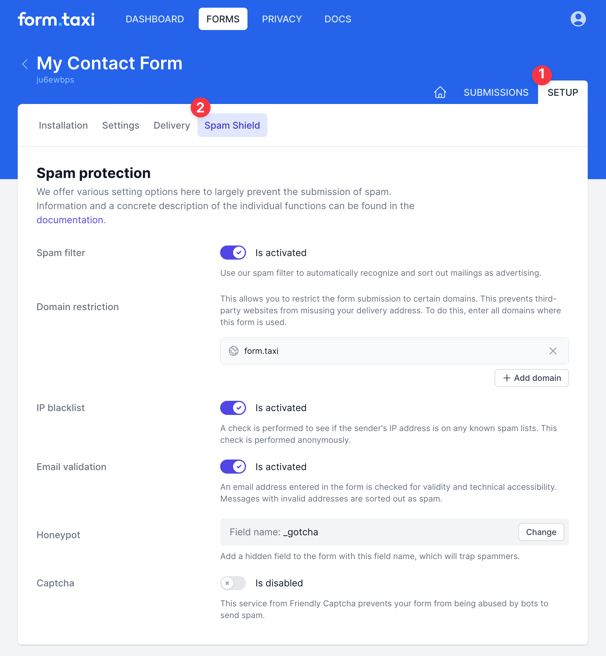
Online forms are often exploited to send unwanted advertising or fraudulent messages. Form.taxi provides a range of features and protective mechanisms to effectively prevent spam submissions. In the configuration area, you can enable the desired protection techniques and adjust the settings for your form connection. You can find these options by your form under Setup > Spam Shiled.
Spam filter
Our built-in spam filter automatically detects unsolicited messages and moves them to the spam folder. For new forms, this filtering feature is enabled by default, but you can switch it on or off at any time in the spam protection settings.
The filter operates fully automatically and becomes more accurate over time through the use of machine learning. It analyzes the form inputs and classifies each submission as valid or as spam based on its learned knowledge of known spam patterns.
Submissions identified as spam are not deleted—they are simply moved to the spam folder. There, you can review them and, if necessary, move them back to the inbox.
Domain restriction
When you specify approved domain names, Form.taxi checks during submission whether the form was sent from a website using one of these allowed domains. If the submission originates from a different domain, it is classified as spam.
This verification is only performed if your website transmits the hostname during form submission. Depending on your web host’s configuration, this hostname may not be sent. In such cases, Form.taxi automatically skips the domain verification.
IP Blacklist
The blacklist is a continuously updated database of IP addresses known to be used for sending spam. When this feature is enabled, the user’s IP address is checked—anonymized—against the blacklist during form submission. If the address appears on the blacklist, the submission is classified as spam.
Email address validation
When this feature is enabled, the email address entered by the user in the form is checked for technical deliverability. This helps ensure that submissions containing fake email addresses are filtered out.
For the system to recognize an input field as an email field, it must use one of the following names: email, e-mail, e-mail-address, e-mail-address, email address, e-mail address, e-mail address, courriel, Электронная почта.
Honeypot
A honeypot is a hidden input field in your form that is invisible to regular users. If this field is submitted with content, it is a clear indication that the form was sent by a bot (an automated script) rather than a legitimate visitor. In such cases, Form.taxi classifies the submission as spam and places it in the spam folder.
If you want to use this method for spam prevention, enter the name of your honeypot field in the spam protection settings. By default, the field name _gotcha is used, but you can choose any name you prefer. Ideally, select a name that does not reveal the purpose of the field.
HTML code for the honeypot field to include in your form:
<input type="text" name="_gotcha" style="display:none" tabindex="-1" autocomplete="off">Captcha
INFO
This feature will no longer be available for new forms from October 19, 2026 onwards!
The captcha feature is not enabled by default, but it is a reliable method for preventing spam abuse—especially if your form is receiving a high volume of spam submissions.
When the captcha feature is enabled, users will see a captcha page after submitting the form. The form submission is only delivered once the captcha challenge has been successfully solved. This captcha page is provided by Form.taxi and has a fixed appearance.
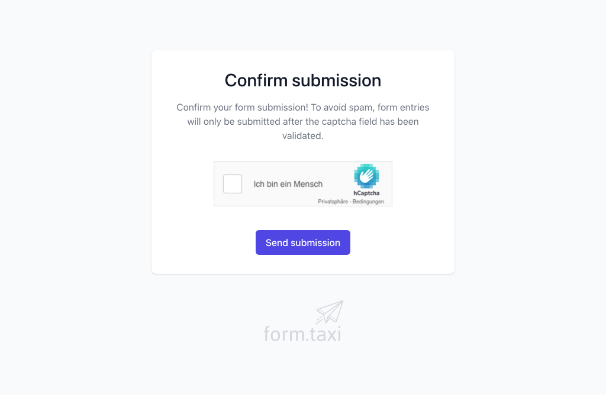
To provide this functionality, we use the service Friendly Captcha. This provider offers a privacy-friendly, GDPR-compliant solution. Only the data necessary for solving the captcha is transmitted, and no personal data is collected. You can find more details in their privacy policy.